Box Model
The CSS box model describes how much space an HTML element occupies and how that space is divided.
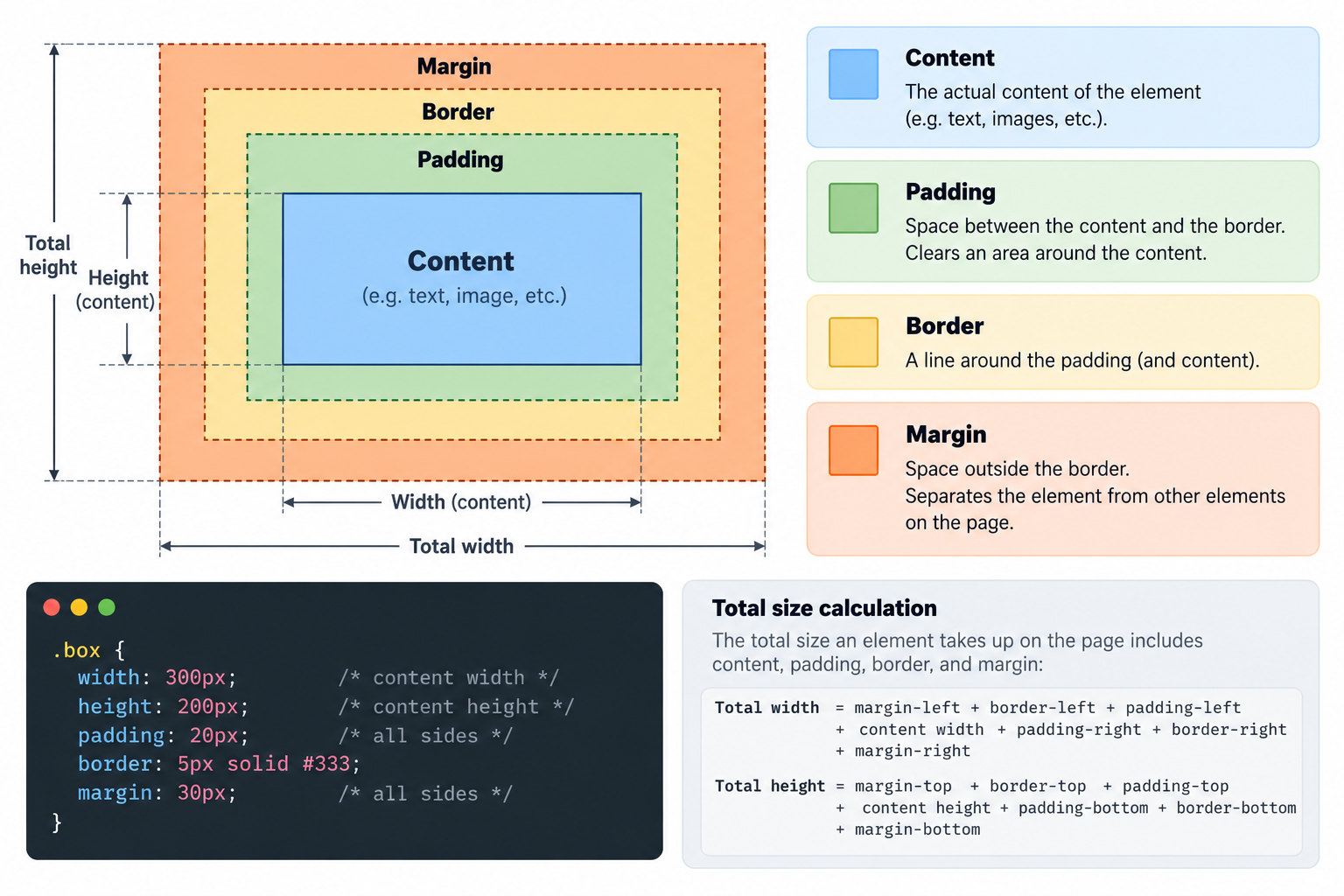
Every HTML element is represented as a rectangular box with four layers:
- Content: the actual text, image, or other content inside the element.
- Padding: the space between the content and the border.
- Border: the visible edge surrounding the content and padding.
- Margin: the space outside the border, separating the element from other elements.
The difference between content-box and border-box
We can take away a few points:
- With content-box (the default) every block's actual width/height is it's width/height property + padding + border.
- With border-box, every block's actual width/height is exactly as you set it. The padding and border is still there just as asked.
- Usually border-box is applied globally. Everybody prefers this. Like so:
* { box-sizing: border-box; }
Using grid to put blocks next to eachother
Please start the next assignment (it's not actually an assigment)
This method of using grid creates an amount of columns. By default every block will take up 1 column (fraction).
display: grid; → A complete selector-declaration block.grid-template-columns: repeat(3, 1fr); → Creates 3 equally wide columns.gap: 10px; → Adds space between blocks.1fr → Means one fraction of the available space.
This method of using grid will try to put as many blocks as possible next to eachother. As long as they meet the minimal requirements.
auto-fit→ Fits as many columns as possible.minmax(200px, 1fr)→ Each column is at least 200px wide, but expands to fill available space..